Run the Board Critic audit
The Board Critic is circsim's read-only, pre-fabrication check of your layout. This guide is the hands-on version: how to run it, read it, and act on it. It never edits your board. It reports risks for you to judge.
It runs on its own
You don't press a "run critic" button. The Critic audits automatically:
- When you open a board: the static checks run immediately: floating/dangling nets, copper clearance, decoupling proximity, and loop area.
- After each operating-point solve: the simulation-informed checks run against the real currents: ampacity and IR-drop (thermal is not active in this version: the panel lists it as "not assessed" because circsim doesn't compute per-part power yet).
So the full flow is: open the board, glance at the static findings, then Energize to unlock the current-dependent ones.
Read the panel
The Board Critic panel (right dock) shows a summary (N error, N warn, N info) then the findings grouped by severity. Before you energize, the current-dependent checks appear as "needs simulation" so you know what a solve would add.
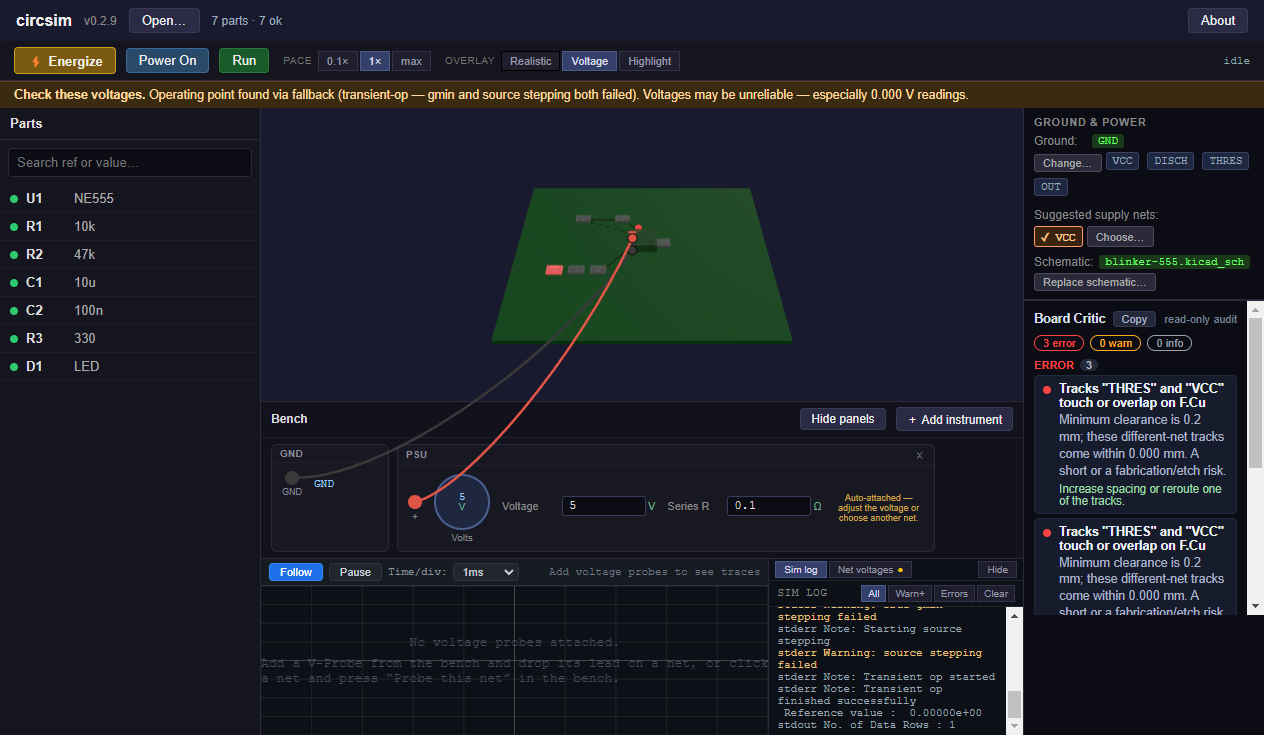
(Above: the bundled 555 sample. The Critic caught real clearance errors ("Tracks touch or overlap … a short or a fabrication/etch risk"), which is the tool working as designed. An earlier build of this screenshot also showed an amber "check these voltages" banner; the bundled 555 model now solves directly, so the sample opens without it.)
Each finding gives you three things to weigh:
- the detail: what it measured and why it matters;
- an "Assumes: …" line: the key assumption, so you can tell if it applies to your board;
- a suggestion: advice, never auto-applied.
Investigate a finding
Click any finding. circsim flies the 3D camera to it and highlights the involved net or part (using the same read-only highlight as hovering; nothing in your board changes). Now you can see the thing being flagged: the thin trace, the far-away cap, the touching tracks.
Decide, then fix in your CAD tool
The Critic reports; you decide; your PCB editor fixes. For each finding worth acting on:
- Read the detail and the "Assumes" line: is this real for your board and your fab?
- If yes, note the net/part, and make the change in KiCad (or wherever you route).
- Re-open the updated board in circsim and confirm the finding is gone.
Common actions the suggestions point to: widen or reroute a track, move a decoupling cap closer to its pin, increase clearance, add a ground pour, connect an exposed thermal pad to ground.
Sharing findings
The panel has a Copy button (top-right) that copies the whole audit (summary, every finding with its detail, assumption, and suggestion, and any not-assessed checks) as plain text, ready to paste into a design review or a note to your fab. For a fuller record, Export report in the top bar saves the findings together with the board's SHA-256, the bench, the part models and the operating point as markdown or PDF: see Save your setup & export a report.
What "no findings" means
An empty panel reads "No risks flagged. Findings are checks, not verdicts." That's the good outcome, stated with deliberate humility. It means nothing tripped the Critic's heuristics, not that the board is guaranteed perfect. The Critic is one layer of a last check, alongside the live bench and your own eyes.
What it won't catch
The Critic's checks are physical-layout heuristics, not a full DRC or signal-integrity analysis. It doesn't model the layer stack, trace parasitics in the simulation, crosstalk, or EM. And the thermal check is a relative proxy, not a temperature. Read the checks reference for exactly what each check does and assumes, and fidelity for the broader limits.
Related
- The Board Critic: the concept and the read-only principle.
- Board Critic checks reference: thresholds and assumptions.
- Energize: unlock the current-dependent checks.